Thursday, August 16, 2018

Tips on Back up iPhone before Upgrading to iOS 12, Better Safe than Sorry!


How to Back up Data with iTunes– The Common Used Backup Tool

iTunes can back up all the data from your iOS device. All you need to do is download the latest version of iTunes to your PC and connect your iPhone to the PC using a USB connector to back up your device.


Connect your iPhone to the PC using a USB cable.


Launch iTunes on your PC.


Click the device icon on the top bar followed by the “Summary” tab in the left bar.


Click the “Back up now” option under Manually Back Up and Restore.


Hit the “Done” button once the backup is complete.


However, there are some limitations of iPhone data back up with iTunes which should pay attention on.


iTunes errors or crash appear during the backup process.


It takes up a lot of space on your local disk if a large storage is used on your device.


There’s no option to selectively back up files. You'll have to back up all data with long time consuming and failure happening.
How to Back up Data with iCloud – Automatic Backup with Wi-Fi

With iCloud, you can automatically back up your iPhone data when your device is connected to Wi-Fi. Apple provides 5 GB for free cloud storage for every Apple ID. So, you can leverage these 5 GB to regularly back up your iPhone data.

Follow these steps to backed up iPhone before upgrading it to iOS 12 using iCloud:


Make sure your iPhone is connected to Wi-Fi.


Open Settings and click your “Name,” followed by “iCloud”.


Make sure the iCloud backup is turned on.


Click “iCloud Backup,” followed by “Back up now”.


To check if the back up is successfully completed, open Settings>Your Name>iCloud>iCloud Storage>Manage Storage.


Pick your device and see if the backup is appearing in the list with the backup size and time.


You'll also need to note these imitations of iPhone data back up with iCloud:


A stable internet connection is a must.


Not all files are retained during the backup.


You have to pay extra money for storage over 5GB.

Now that you know three different ways to back up iPhone before upgrading to iOS 12, it’s better you do it in time to avoid data loss. Jihosoft Giveaway Alert:

iPhone Backup Extractor - Extract Data from iPhone Backup

The best iPhone Backup Extractor software to extract photos, text messages, contacts, voice memos, note, WhatsApp, Viber and etc from iPhone/iPad backup.

Must Read:Jihosoft iTunes Backup Unlocker

Jihosoft Android Data Recovery: the best Android Data Recovery software for Windows and Mac to recover deleted contacts, messages, photos, videos, WhatsApp and etc from Android devices.

If you can’t sync with iTunes and want to rescue data from a disable iPhone, you could try Gihosoft iPhone Data Recovery. Also feel free to ask questions on the iDevice is disabled error in the comments section below.

Wednesday, July 11, 2018

Electra1131 v1.0.2 With Fixes For Dev Account Version Released

As we mentioned in our Electra fixes article, the release of Electra1131 has not been a smooth ride for all users. Many users are experiencing issues like instant reboots right when they start the jailbreak process or Cydia not showing up.

Good news is Team Electra is working hard to fix issues and have released Electra1131 v1.0.2. With this new version the team has attempted to fix the regression issue that reduced the jailbreak success rate for the the Apple Developer Account version of the tool, which uses multipath tcp exploit.

If you accidentally deleted or lost videos on iPhone, first please check on the Recently Deleted folder. Alternatively, you can use the professional tool Gihosoft iPhone Recovery to recover deleted iPhone videos from Camera Roll or some apps.


Thursday, August 10, 2017

Finger Paint With iOS 11 and ARKit


We’ve put together a collection of demonstrations showcasing the power of iOS 11 and ARKit, and, since then, we’ve even seen the software used to enhance navigation instructions while walking, and what a popular music video from A-Ha looks like.
But for those who want to get really creative when ARKit launches, there will be at least one method to do that. The latest demonstration, which was initially published to the site Toptal, shows what it will look like to fingerprint in augmented reality, and then turn those creations into digital 3D models. iMyFone D-Back iOS Data Recovery Get Back Lost Files on iPhone:
Thanks to software in iOS 11 called Vision, and ARKit, the software makes it work like the person creating the art is holding a pen, and then the digital ink is displayed as realistically as possible. Once you’ve finished drawing what you want, the creator will be able to “pull” the creation into a 3D space, effectively making a 3D object.
“One of the cool libraries that Apple introduced in iOS 11 is Vision Framework. It provides some computer vision techniques in a pretty handy and efficient way. In particular, we are going to use the object tracking technique. Object tracking works as follows: First, we provide it with an image and coordinates of a square within the image boundaries for the object we want to track. After that we call some function to initialize tracking. Finally, we feed in a new image in which the position of that object changed and the analysis result of the previous operation. Given that, it will return for us the object’s new location.”

You can find the full write-up of what it took to put the demonstration together through the source link below. You can watch it in action in the video as well.

How To Solve Forgetting Apple Watch Password 2017?

Before getting started, you should note that although both these methods involve removing the passcode from the smartwatch, the process will cause the data loss but in reality. But you won’t lose anything as everything can be restored from your last backup 
Solutions 1: Reset Apple Watch On Paired iPhone
  1. Put your Apple Watch and its paired iPhone close each other to keep the connectivity. After that, launch the Apple Watch app on your iPhone. 
    Tips:
    Must read:icloud activation lock removal
  2. Move to the My Watch
  3. Head to General -> Reset.
  4. Now choose the ‘Erase Apple Watch Content and Settings’ and tap on Confirm when being prompted. Moreover, you are also required to enter your Apple ID and Password.
  5. Finally wait for the process to complete.
Now, you simply set up your Smart Watch again and use it as usual. If you’d like, you can restore your last backup.
Also read: How to utilize theater mode on the Apple Watch
Solutions 2: Reset Apple Watch Without iPhone
To fix forgetting Apple Watch passcode, there is another method for you
  1. Make sure your Apple Watch is connected to a dock charger before getting started, so that the battery won’t run out midway.
  2. Now press and hold the side button until the Power Off Slider line displays.
  3. Tap and hold the Power Off Slider and after a few seconds, lift your finger.
  4. The ‘Erase all content and settings’ option will now appear, tap on it.
  5. Wait for the erasing process to complete. Before using your watch as usual, you can restore it from the previous backup if you want to.
Sponsor ads:
Gihosoft iPhone Data Recovery Free
Free iPhone Data Recovery Software for Windows/Mac
Recover up to 12+ types of files, including contacts, SMS, photos, WhatsApp, Viber, notes, etc.
Restore lost data from iOS devices directly or from iTunes and iCloud backup
Recover iPhone data lost due to iOS upgrade/jailbreak, accidental deletion, device lost or broken
Support all the latest iPhone, iPad and iPod Touch
Both Free and Pro version.
If you lost data after you updated to a new iPhone, you can always use Gihosoft iPhone Data Recovery to get the data back from the old iPhone or backup.You may also like: iphonerecovery.com
If you use android phones, please choose Gihosoft Android Data Recovery.
With Gihosoft Android Data Recovery, no longer afraid of data loss!

Tuesday, August 8, 2017

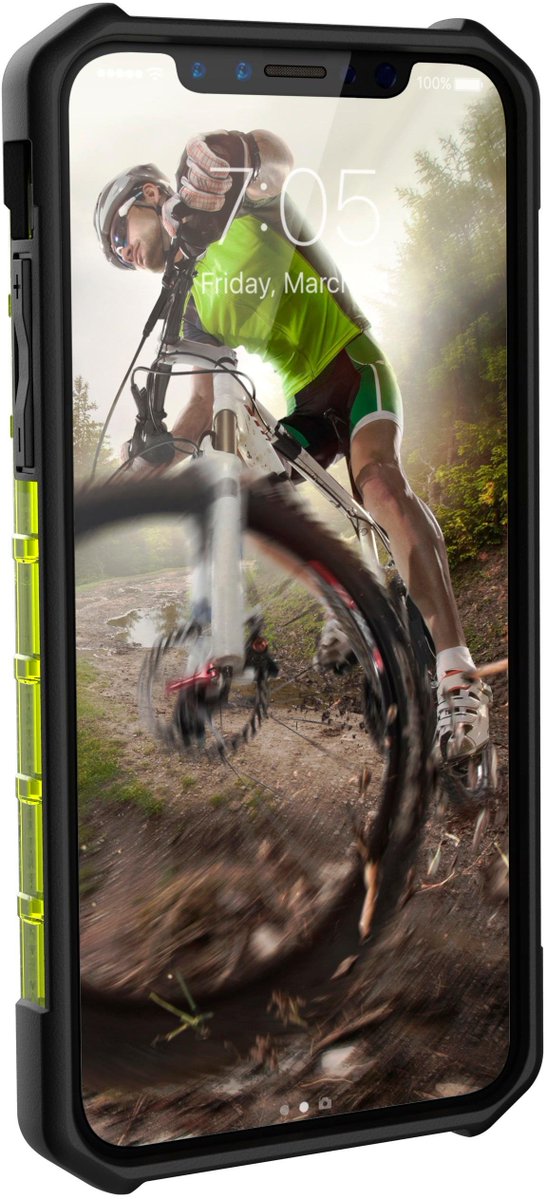
This image of iPhone will bring big smile on your face

Apple iPhone 8 is expected to make a debut in September. Evan Blass, a well-known blogger who established a reputation by accurately leaking images of new cellphones, says the image above is the upcoming Apple iPhone 8.


In the leaked image, the iPhone 8 has been shown encased in a smartphone cover with a nearly bezel-less design and a distinct top notch - expected to feature a range of sensors including the 3D front camera. 

Must Read: iOS 11 beta 4 reveals one of the cool features for iPhone and iPad users

The design on the display is almost identical to some of the earlier leaks and is quite likely to be the final design on the iPhone 8 as well. While Blass didn't share the name of the case-maker, 9To5Mac points out that the case in the leaked render resembles the ones made by UAG.


Considering the fact, that the image is leaked from the smartphone case vendor, which cannot be trusted fully for the design, but it appears to look almost exactly like other designs that have spilled out in recent weeks and months. It also aligns with an image that appeared in code that powers Apple's new HomePod speaker, showing a smartphone with an identical front display. Finally, Blass' accurate track record adds a bit of legitimacy to the image.

Must read:Gihosoft Free iPhone Data Recovery:https://www.gihosoft.com/iphone-data-recovery-free.html

According to Apple analyst Ming Chi-Kuo of KGI Securities, Apple will go for a “two-step fingerprint and facial recognition system” for iPhone 8. The front camera in iPhone 8 is said to support 3D facial recognition, and details of this upcoming feature were shared in a Bloomberg report by Mark Gurman. The highlight of iPhone 8 will be dual rear cameras, with LED flash tucked in between the two lenses. This kind of a setup is supposed to help with augmented reality (AR) features.

Read More: These tips will help your iPhone battery last for more than a day

As per the recent reports, the phone is rumored to cost between $1,200 and $1,400 (£920 to £1,075), significantly more pricey than previous generations of the device. Last year's iPhone 7 cost $969 for the most expensive model.


Apple is expected to unveil three new iPhones next month; a 7s and 7s Plus that largely take after last year's models and a premium model with the new design and technology.

iOS 11 refines the features introduced in iOS 10

On the iPhone, iOS 11 refines the features introduced in iOS 10. Here are the main features:
  • The Lock screen and Notification Center are merged so you can now swipe up on the Lock screen to view all your notifications, right there.

    Must read:Gihosoft Free iPhone Data Recovery:https://www.gihosoft.com/iphone-data-recovery-free.html
  • Control Center is back to being just one screen. There are now tiles that you can 3D Touch to expand to view more information.
  • Apple has redesigned the iMessage app drawer to make it easier to use.
  • You can now use Apple Pay to pay other Apple Pay users, right from the Messages app.
  • A potential end-all for syncing frustrations – iMessage, Siri, and Photos data will now sync between all your devices using iCloud.
  • Siri now has a more natural voice, supports translation and gets a small visual update. Siri also supports list and QR code apps.
  • App Store gets a big new redesign to make it look more like Apple Music. There are new tabs for Today, Apps and Games view.
  • Do not Disturb While Driving feature automatically disables all notifications when you’re driving.
  • When you take a screenshot, you’ll now get a little preview of it in the bottom-left corner. Tap on it and you’ll be able to mark up the screenshot before saving it or sharing with anyone.
  • Files app replaces iCloud Drive app.
To see how all these new features work, read our in-depth coverage of the best iOS 11 features for iPhone.

How to Run iPhone Battery Diagnostics on MAC ?

How to Run iPhone Battery Diagnostics on MAC ?

Steps to Install

Step1: Firstly, you have to download coconut battery. For this, you must prefer coconutBattery version 3.4. Take into consideration that it only works on Mac OS machines, in case you are running Windows then you have to get a Mac for this job.
Step2: Scroll down on the page until you reach to the “Download 3.4” link and if updates have been implemented. If current version doesn’t support your needs, the web page will offer some older compatible versions with older operating systems.
Step3: Your file i.e.”.zip” is of 8.5MB at the time of writing and would take no time to install. One of the best features of coconutBattery is its universal ease of use and lightness, i.e.; it will not stick to your CPU. This app will also show your battery diagnostics on your Mac too.

Steps for running the app:

Step1: Double click on the file that you have downloaded to open it.
Step2: If the application is not launched at that moment, you need to click on the “Open” present on the warning window.
Step3: When it is opened, prefer coconutBattery to search for updates automatically. This will help you when new features are added on, and you must take it.

Steps for viewing data

Step1: With coconutBattery opened, you will be presented with stats about both your Mac that is running the application and stats about Mac’s battery, if it has one.


Run iPhone Battery Diagnostics on Mac

Step2: To view stats about your iOS device, select “iOS Device” from the menu bar.


Run iPhone Battery Diagnostics on Mac

Step3: All battery details will be displayed at the bottom of the screen. For further details such as age, serial number, and processor, you can select “Device Details.”


Run iPhone Battery Diagnostics on Mac

Deciphering Data

Charge Capacity: Power is displayed as milliamp hours or mAh. In cases of 6s, it can store 1715mAh of power, but use has declined to a maximum charge of 1311mAh or 76.4%. This decline happens from a device of its age like 477 days old but if your device’s maximum is less than the design capacity, then prefer to exchange your battery.
Load cycles and Usage: One load cycle is one full discharge followed b one full charge i.e., from 0% to 100%. So if you have 50% charge then use up to 50%, i.e., one load cycle. On an average, you can go up to 1000 load cycles before the battery’s capacity falls behind the design capacity.
Also Read: How to Make Your Android Look like an iPhone (Without Root)
If the battery looks ship shape, it probably is. If it is not, then make a Genius Bar appointment and get it checked out. If possible, visit an Apple authorized service provider for any hardware repair as the third party will void your warranty. For any battery replacement at an Apple Store, an expert will run a similar application to coconutBattery before going through with repair to verify the issue.Sponsor ads:
Gihosoft Free iPhone Data Recovery:iphonerecovery.com
Free iPhone Data Recovery Software for Windows/Mac
Recover up to 12+ types of files, including contacts, SMS, photos, WhatsApp, Viber, notes, etc.
Restore lost data from iOS devices directly or from iTunes and iCloud backup
Recover iPhone data lost due to iOS upgrade/jailbreak, accidental deletion, device lost or broken
Support all the latest iPhone, iPad and iPod Touch
Both Free and Pro version.
If you lost data after you updated to a new iPhone, you can always use Gihosoft iPhone Data Recovery to get the data back from the old iPhone or backup.
Worth reading:download youtube 1080p

Software Review of iMazing Music Transfer

Software Review of iMazing Music Transfer iMazing Music Transfer is a trusted software to transfer data to/from iPhone. It gives you full co...